

Hi, apologies for yet another “help me replace my Windows app 😭” post. I am attempting to move to Linux and have been mostly successful - day-to-day stuff, programming, games, it all works great! The biggest deal-breaker so far has actually been a music player… Is there anything that comes even close to MusicBee? I have yet to find it and am surprised there is such a gap in the space considering Linux seems full of data hoarders and collectors. Before you ask, I have tried running MusicBee through Wine but I just don’t think it will work - Everything is 3x slower than in Windows, there are little bugs everywhere, pressing the wrong dialogue may crash the program, and some pages just don’t load… So! Let’s get into my pipe-dream of what I would want to keep from MusicBee:
Must-haves (deal-breakers):
- Multiple artist tags!!! All my files have artists tagged separately, with a display artist tagged separate. I can change the internal tags I use, but I can’t go without any form of multi-artist support.
- Browsing and searching by various tags, such as Album Artist and Genre.
- Support for volume levelled (replay gain) playback.
Features that I feel I need:
- Scrobbling.
- Auto playlists that support any combination of tags and preferrably allow referencing other playlists.
- Registering external tools to send files to via shortcuts or context menus, to supplement the features that I inevitably will miss.
Nice-to-haves (could be replaced with another app or script or by re-organising my library):
- Tag editor
- Support for custom tags.
- Conversion to other file types including playlist re-labelling.
- File moving and re-organisation based on user-customisable formats, i.e
<Album Artist>/<Album>/<Title>. - Tagging of volume levelling (replay gain).
Yeah, I don’t think it’s happening either. But I figure I should ask before I just give up. Web apps would be fine too, btw! If you’re wondering why I want custom tag support, it’s because: I’ve found it much easier to use for auto-playlist creation, and I have found it more resistant to data loss and file moves since I don’t have to rely on the music players internal library. It could be replaced by transferring that data into the Comments or Keywords tag, but that still requires very strong auto playlist support.
So my question is this:
Are there any Linux-native music players that fit some of these criteria? If not, what is your favourite that comes close? And as an additional question, if you were to extend an open source player to support any of these features, which do you think would be the best basis to build upon?
You must log in or register to comment.
Strawberry perhaps?
It’s the closest we’ve got, but it does not have multiple tag support that I can see. :( I am not surprised that it lacks multi-artist, that is niche, but even the genre only supports basic strings. So to create an auto playlist that only matches the “Rock” genre, you have to use
containswhich then matches Hard Rock, Alternative Rock, etc etc. I know I’m picky lol, but worth documenting this to save time for anyone else as picky as me.Ah ok, bummer
Beets for cleaning up the tags and self-hosted navidrome appears to support multiple artist tags. The web interface of navidrome definitely supports filtering by both albumartist and artist (the latter will include albums and tracks with multiple artists). I assume this is what you are trying to achieve by using a visual artist tag? If you just want to rename an artist but keep the underlying artist tag, that can probably also be achieved with beets.
This link shows the details of how navidrome handles tagging: https://www.navidrome.org/docs/usage/library/tagging/ The issue if you don’t want to use the navidrome web interface is that not all clients support browsing by artist I suspect (and often use albumartist, which I personally prefer). I use supersonic which I doesn’t appear to support it, but there’s also Feishin and a bunch of mobile clients you could use (or open a feature request on supersonic github).
Replaygain will be supported by most clients (not sure about the navidrome web interface).
Also a little fun thing about Navidrome, when checking the community packages entry: https://www.navidrome.org/docs/installation/packages/
There’s a package for Termux, which is a terminal emulator for Android. Navidrome is in its official repo.So it’s pretty simple to run Navidrome directly on a phone too. I’ve been doing that for a while now. Also, Navidrome now finally has CLI user management.
Not relevant, you can stop reading here.
When I forgot my admin password in the past and I didn’t want to reset everything, I had to do a weird thing. I utilized the External Authentication (formerly called Reverse Proxy Authentication) to login into the admin account. I did so withproxy_set_header Remote-User "admin"in NGINX config (yes, still on a phone, in Termux) to get automatically logged in. But even then, I couldn’t change admin password without the old password… but I could change regular users’ and also create another admin account. So I did, removed the proxy auth, logged into admin2, changed admin to regular user, set the password, changed it back to admin and then from it deleted admin2.Great recommendation on Feishin. Navidrome alone works for most of what I want as it does respect multiple artist tags, but the default web UI is subjectively bad and lacks any way to add smart playlists. Feishin solves both of those issues. I’ll be testing this further, it may just solve my browsing problems! I knew about Beets from a long time ago but never checked it out, I’ll have to see how that goes for my back-end needs. I have a feeling the disconnect between front-end and back-end will likely annoy me for a while as I try adding new files, but we’ll see.
I assume this is what you are trying to achieve by using a visual artist tag?
The display artist (a MusicBee-specific feature) is just an easy way to keep multiple artists in the artist tag while retaining a nice readable tag. For instance that artist tag would be
Apashe; Wasiubut the display would beApashe feat. Wasiu. MusicBrainz does something similar but usesartistsinstead ofartistandartistinstead ofdisplayartist. Feishin displays the raw data nice enough I don’t mind losing the display though (it’s all in the tags anyway, no actual data loss there).
I couldn’t find anything comparable with Musicbee…
I too was having the issues you described with wine. Here’s how to fix it. Uninstall musicbee , install .NET Framework 4.8 via winetricks , and then install musicbee again. And it should work.
After doing the initial library scan, I don’t see any significant slowdowns in my 30,000 song library. Album art is sometimes a little slow to load in when scrolling but that’s all I really noticed
I followed this video: http://www.youtube.com/watch?v=AO7thSZbg4A
Strawberry perhaps? I found it a very in depth music app.
@IronKrill Quodlibet could be what you’re looking for.
This is the closest local app I’ve found yet, thank you! The UI is different from what I am used to, but it has support for all tags in both the editor and the browser including support for adding custom tags. I thought dynamic playlists don’t exist and was technically right, because they are accomplished with saved searches. I realised that after checking docs. Thanks for the recommendation!
Custom tags can also be added to pretty much every element of the UI.
Quod Libet’s been my favorite player for a long time due to how customizable it is and how well it scales to extremely large music libraries.
MusicBee is one of the programs I miss the most. My son told me he still runs it through Wine with some fiddling so it seems possible. Personally I’ve settled on Lollypop. I’m not in love with it; it’s fine. It’s quite minimalist… maybe too much for some. I use Puddletags for editing tags and Syncthing to sync music from my PC to my phone.
Have you tried MusicBrainz Picard? I think it should be able to do most of the things you need.
I’ve used it a lot on Windows! Quite handy for preliminary tagging. I haven’t used its file organisation though, but it could do the trick. I found the scripting language so obtuse though that I decided I’d rather tackle Python’s Mutagen library jank instead >_>
I’m in the same boat! Musicbee was my replacement for Winamp when that went away, and it did everything I wanted, tagging, podcasts, playlists. I still ajve it on my work PC, but I’m missing it at home. Thanks for making this thread, hopefully you find something that works
Audacious works much the same as WinAmp and even has WinAmp skins you could switch to.
deleted by creator
Amarok and Rhythmbox are close. Most players you’ll find are less on the media management side as they want to be low-profile, where Musicbee seems to intentionally be both.
Edit: There’s Strawberry as well, which is cross platform
Rhythmbox unfortunately does not support multiple tags, that I can see. It combines genres into one and any artist tag beyond the first is completely ignored and unsearchable.
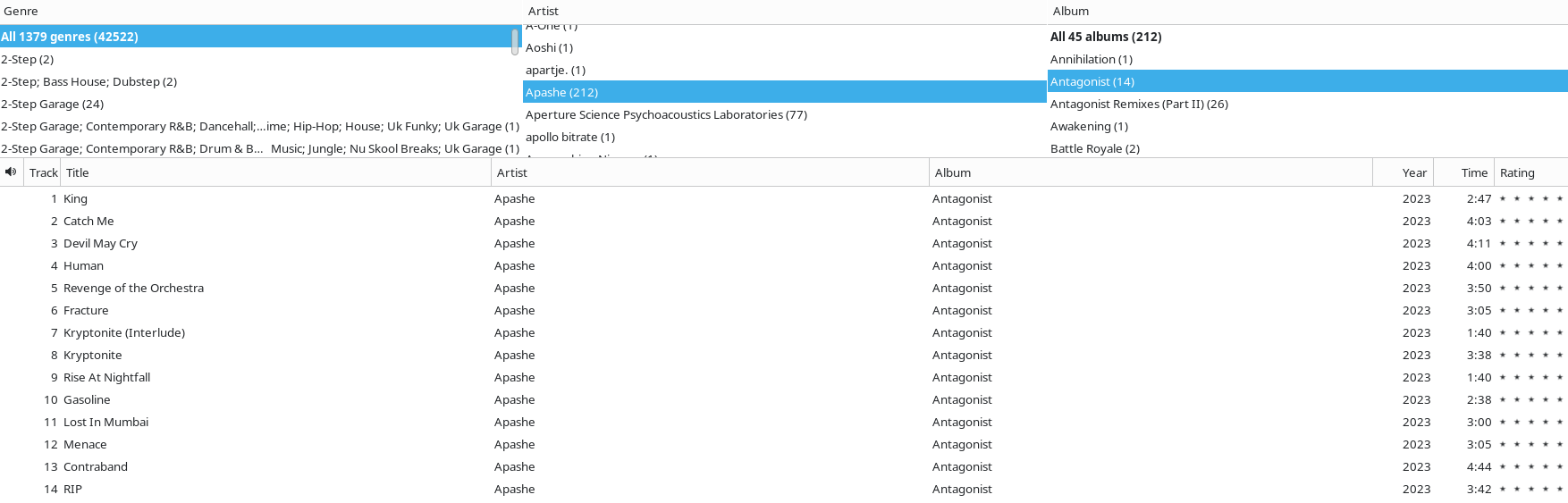
Amarok is a similar story, artists and genres are combined into one string. You can search them via “contains” but that is very imprecise.
Can’t remember any native programs, and the ones I use have very few of the functions you need. And not quite a solution, but while you don’t find a replacement, maybe you could try to run MusicBee through Wine?
Hey, out of curiosity I installed musicbee portable (aside: it’s not very portable) using wine in cachyos (latest cachyos with latest wine).
I set a custom install directory and imported my music. It appears to have worked and I have it playing music right now.
This has been my exact issue with native Linux music players ever since I switched to Linux like a year and a half ago. I’ve been using MusicBee via Wine pretty successfully but not without some (mostly minor) bugs. No FOSS devs seemed to anticipate my niche use case of needing my Weasel Walter / Mary Halvorson / Peter Evans albums, my Weasel Walter / Mary Halvorson album, and my Weasel Walter / Peter Evans album to all sort into Weasel Walter’s discography while simultaneously the first two sort into Mary Halvorson’s discography and the first and third sort into Peter Evans’ discography, nor did they anticipate my need to tag an album as both Free Improvisation and Harsh Noise rather than sorting it into a separate third “Free Improvisation; Harsh Noise” category lol.
I’m using gmusicbrowser. It’s unmaintained since long time ago, but still has a working migrated branch to gtk3. I have forked and fixed some issues that were bugging me, able to compile a deb package on my own. I wish I had more energy in my life, I’d love to code a bit more and maybe reintroduce it back into Debian repos
I loved Musicbee. On Linux, I found gmusicbrowser to be most similar. Just needs a little tweaking of the window panes - but you could also say that about Quod Libet, that also comes with many layouts while being quite fast.